
A big thanks to everyone who attended my sessions earlier this week at DevTeach. When I give a presentation, my success criteria is that I get you excited enough to continue investigating the topic yourself. So an extra special thanks to all the attendees who took the time to talk to me afterwards. I obviously got some of you excited enough to continue learning what I was talking about! Awesome!!!
Another reason I love conferences is hanging with my peeps. I had a great time catching up with friends old and new in scenic, if somewhat cold, Montreal. Kudos to Jean-René Roy for putting on another fantastic conference.
Git Dojo
 The week started off with the fun-filled and action-packed Git Dojo with me on keyboards and Jessica Kerr on vocals and whiteboard. We even had a drummer, Howard Dierking, sit in for a set – attempting to wreak havoc on the repo when he .gitignore’d the Markdown files. The dojo was saved when he disappeared in a Spinal Tap-esque explosion midway through the set.
If you want to check out the Git Dojo yourself, you can clone the git-happens repo and follow along with the notes.
Emergent Architecture with TDD/BDD
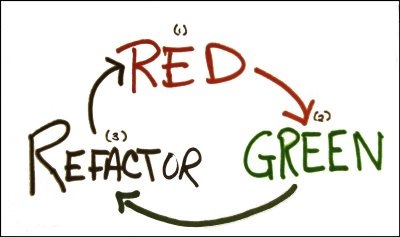 I had a lot of fun with this session talking about the failure of UML as a design tool -though a great whiteboarding language. The holy grail of software design is the executable specification, which can be achieved with TDD/BDD. Executable specifications have the nice property of not only validating business requirements, but making it possible to validate non-functional requirements. I talked about some agile principles and techniques for good measure because that’s what I do. This led to the following tweet:
If something hurts, do it more. Deployments, tests, do it more often and fix the problems that make it painful. #DevTeach @jameskovacs
— Jessica Kerr (@jessitron) December 11, 2012
I’m not the first person to say this, but good to keep the idea circulating in our collective consciouses. 26 retweets and counting ain’t too bad. Happy to do my little part to make the software development world a better place for all of us.
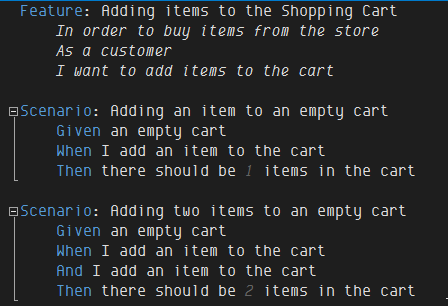
I then talked about tools for creating executable specifications, specifically MSpec and SpecFlow (.NET) and RSpec and Cucumber (Ruby). We then dove into code with MSpec and SpecFlow because it was a more .NET crowd in the room. I especially loved the look of mild shock on some attendees faces when I executed what looked like a plain text file, which was in fact a SpecFlow/Cucumber file:
The slide deck for Emergent Architecture with TDD/BDD is available here and the demos here.
Testable JavaScript
 Ah, JavaScript… the red-headed stepchild of the language world. I talked a bit about the history of JavaScript and the increasing complexity of client-side applications as well as the recent rise of JavaScript on the server-side with Node.js. The need for JavaScript testing is more important now than ever. Fortunately there are some great testing/spec’ing frameworks available. I compared and contrasted QUnit, Jasmine, and Mocha. QUnit is wonderful for its simplicity, Jasmine excels at UI testing especially when paired with Jasmine-jQuery, and Mocha rules the roost for the elegance of its async testing support, which is no surprise given that it was born in the Node.js world. Regardless of which framework you choose, please please please give your client-side JavaScript code as much respect as your server-side code and write some tests/specs for it – preferably in a TDD/BDD fashion.
The slide deck for Testable JavaScript is available here and the demos here.
Coming Soon…
 I’ll be presenting both Emergent Architecture with TDD/BDD and Testable JavaScript at CodeMash in Sandusky, Ohio, which is happening January 8 to 11, 2013. If you’re attending CodeMash, I’d love to see you in my sessions! Plus be sure to drop by and see me at the JetBrains booth where I’d be happy to teach you some ReSharper, RubyMine, or WebStorm ninja skills.
 Thanks to everyone who came out to my sessions at Prairie Dev Con in Regina last week. Once again, D’Arcy Lussier put on a great conference.
 Thank you to everyone who came out to my sessions at the
  I’ll be in Saint Louis, MO in mid-July to speak at the local Ruby and JavaScript user groups.
 In mid-August, I’ll be speaking at That Conference in Wisconsin Dells, WI. That Conference, which is being organized by
  In late August, I’ll be giving a number of Ruby-focused talks at devLINK in Chattanooga, TN. My friend and fellow vegan developer,
  As some of you might have noticed, I’ve been talking about Ruby and Ruby on Rails more recently. It’s often good to get outside your comfort zone and see how other (web) developers live. One of the areas where Ruby really excels is the wealth of innovative testing/spec’ing libraries available. When writing tests/specs, we need objects to play with. Ruby has a variety of options in this regard, but I particularly like the factory approach espoused by gems such as
  To say that I’m a big fan of
  To answer a few burning questions that I’m sure people have… I’ll still be based out of Calgary, Alberta, Canada. I’ll still be speaking at various conferences and user groups – and not just about JetBrains products. (It will be the usual mix of software practices, development techniques, and technologies. So expect to see me at conferences and events both as a speaker and representing JetBrains.) I’ll still be producing Pluralsight videos. (NHibernate Fundamentals will be available soon and I’m already work on Git Fundamentals. JetBrains and Pluralsight will continue to partner on various initiatives.) I’ll still be involved in open-source software. And I’ll still be causing the usual amount of trouble on Twitter and elsewhere. Happy coding!
